 |
To obtain help regarding the use of the airGRteaching or airGR packages, or to suggest modifications, send an email to airGR@inrae.fr |
How to run the airGR hydrological models in only three simple steps with airGRteaching
Preparation of observed data for modelling
A data.frame of daily hydrometeorological observations time series at the catchment scale is needed. The required fields are:
- DatesR : dates in the
POSIXtformat - P : average precipitation [mm/time step]
- T : catchment average air temperature [℃] [OPTIONAL]
- E : catchment average potential evapotranspiration [mm/time step]
- Qmm : outlet discharge [mm/time step]
head(BasinObs)
##       DatesR    P   E    Qmm    T
## 1 1984-01-01  4.1 0.2 0.6336  0.5
## 2 1984-01-02 15.9 0.2 0.8256  0.2
## 3 1984-01-03  0.8 0.3 2.9280  0.9
## 4 1984-01-04  0.0 0.3 1.8240  0.5
## 5 1984-01-05  0.0 0.1 1.5000 -1.6
## 6 1984-01-06  0.0 0.3 1.3560  0.9
Before running a model, airGRteaching functions require data and options with specific formats.
For this step, you just have to use the PrepGR() function. You have to define:
ObsDF:data.frameof hydrometeorological observations time seriesHydroModel: the name of the hydrological model you want to run (GR1A, GR2M, GR4J, GR5J, GR6J, GR4H or GR5H)CemaNeige: if you want or not to use the snowmelt and accumulation model
If you want to use CemaNeige, you also have to define:
- catchment average air temperature in
ObsDFor inTempMean HypsoData: a vector of 101 reals: min, quantiles (1 % to 99 %) and max of catchment elevation distribution [m]; if not defined a single elevation layer is used for CemaNeigeNLayers: the number of elevation layers requested [-]
PREP <- PrepGR(ObsDF = BasinObs, HydroModel = "GR5J", CemaNeige = FALSE)
Calibration step
To calibrate a model, you just have to use the CalGR() function. By default, the objective function used is the Nash–Sutcliffe criterion ("NSE"), and the warm-up period is automatically set (depends on model). You just have to define:
PrepGR: the object returned by thePrepGR()functionCalPer: a vector of 2 dates to define the calibration period
You can obviously define another objective function or warm-up period:
CalCrit: name of the objective function ("NSE", "KGE", "KGE2", "RMSE")WupPer: a vector of 2 dates to define the warm-up period
The calibration algorithm has been developed by Claude Michel (Calibration_Michel() function in the airGR package) .
CAL <- CalGR(PrepGR = PREP, CalCrit = "KGE2",
             WupPer = NULL, CalPer = c("1990-01-01", "1993-12-31"))
## Grid-Screening in progress (0% 20% 40% 60% 80% 100%)
## 	 Screening completed (243 runs)
## 	     Param =  175.915,   -0.110,   83.931,    1.857,    0.467
## 	     Crit. KGE2[Q]      = 0.8300
## Steepest-descent local search in progress
## 	 Calibration completed (18 iterations, 406 runs)
## 	     Param =  188.670,    1.456,   83.931,    1.779,    0.493
## 	     Crit. KGE2[Q]      = 0.8787
Simulation step
To run a model, please use the SimGR() function. The PrepGR and WupPer arguments of SimGR() are similar to the ones of the CalGR() function. Here, EffCrit is used to calculate the performance of the model over the simulation period SimPer and CalGR is the object returned by the CalGR() function.
SIM <- SimGR(PrepGR = PREP, CalGR = CAL, EffCrit = "KGE2",
             WupPer = NULL, SimPer = c("1994-01-01", "1998-12-31"))
## Crit. KGE2[Q] = 0.8549
## 	SubCrit. KGE2[Q] cor(sim, obs, "pearson") = 0.9012
## 	SubCrit. KGE2[Q] cv(sim)/cv(obs)          = 0.8974
## 	SubCrit. KGE2[Q] mean(sim)/mean(obs)      = 0.9724
Formating outputs
The call of the as.data.frame() function with PrepGR, CalGR or SimGR objects allows to coerce the outputs to a data frame.
head(as.data.frame(PREP))
##        Dates PotEvap PrecipObs PrecipFracSolid_CemaNeige TempMeanSim_CemaNeige
## 1 1984-01-01     0.2       4.1                        NA                    NA
## 2 1984-01-02     0.2      15.9                        NA                    NA
## 3 1984-01-03     0.3       0.8                        NA                    NA
## 4 1984-01-04     0.3       0.0                        NA                    NA
## 5 1984-01-05     0.1       0.0                        NA                    NA
## 6 1984-01-06     0.3       0.0                        NA                    NA
##     Qobs Qsim
## 1 0.6336   NA
## 2 0.8256   NA
## 3 2.9280   NA
## 4 1.8240   NA
## 5 1.5000   NA
## 6 1.3560   NA
head(as.data.frame(CAL))
##        Dates PotEvap PrecipObs PrecipFracSolid_CemaNeige TempMeanSim_CemaNeige
## 1 1990-01-01     0.3       0.0                        NA                    NA
## 2 1990-01-02     0.4       9.3                        NA                    NA
## 3 1990-01-03     0.4       3.2                        NA                    NA
## 4 1990-01-04     0.3       7.3                        NA                    NA
## 5 1990-01-05     0.1       0.0                        NA                    NA
## 6 1990-01-06     0.1       0.0                        NA                    NA
##    Qobs     Qsim
## 1 1.992 2.523954
## 2 1.800 2.446199
## 3 2.856 2.943436
## 4 2.400 3.286214
## 5 3.312 3.512572
## 6 3.072 3.224969
head(as.data.frame(SIM))
##        Dates PotEvap PrecipObs PrecipFracSolid_CemaNeige TempMeanSim_CemaNeige
## 1 1994-01-01     0.4       2.2                        NA                    NA
## 2 1994-01-02     0.4       0.0                        NA                    NA
## 3 1994-01-03     0.6       0.7                        NA                    NA
## 4 1994-01-04     0.6       3.2                        NA                    NA
## 5 1994-01-05     0.6      35.1                        NA                    NA
## 6 1994-01-06     0.5      21.3                        NA                    NA
##    Qobs     Qsim
## 1 2.904 3.593023
## 2 2.832 3.414026
## 3 2.364 2.988078
## 4 2.544 2.668972
## 5 2.640 3.526016
## 6 8.928 8.819935
Formating outputs
The call of the as.data.frame() function with PrepGR, CalGR or SimGR objects allows to coerce the outputs to a data frame.
head(as.data.frame(PREP))
##        Dates PotEvap PrecipObs PrecipFracSolid_CemaNeige TempMeanSim_CemaNeige
## 1 1984-01-01     0.2       4.1                        NA                    NA
## 2 1984-01-02     0.2      15.9                        NA                    NA
## 3 1984-01-03     0.3       0.8                        NA                    NA
## 4 1984-01-04     0.3       0.0                        NA                    NA
## 5 1984-01-05     0.1       0.0                        NA                    NA
## 6 1984-01-06     0.3       0.0                        NA                    NA
##     Qobs Qsim
## 1 0.6336   NA
## 2 0.8256   NA
## 3 2.9280   NA
## 4 1.8240   NA
## 5 1.5000   NA
## 6 1.3560   NA
head(as.data.frame(CAL))
##        Dates PotEvap PrecipObs PrecipFracSolid_CemaNeige TempMeanSim_CemaNeige
## 1 1990-01-01     0.3       0.0                        NA                    NA
## 2 1990-01-02     0.4       9.3                        NA                    NA
## 3 1990-01-03     0.4       3.2                        NA                    NA
## 4 1990-01-04     0.3       7.3                        NA                    NA
## 5 1990-01-05     0.1       0.0                        NA                    NA
## 6 1990-01-06     0.1       0.0                        NA                    NA
##    Qobs     Qsim
## 1 1.992 2.523954
## 2 1.800 2.446199
## 3 2.856 2.943436
## 4 2.400 3.286214
## 5 3.312 3.512572
## 6 3.072 3.224969
head(as.data.frame(SIM))
##        Dates PotEvap PrecipObs PrecipFracSolid_CemaNeige TempMeanSim_CemaNeige
## 1 1994-01-01     0.4       2.2                        NA                    NA
## 2 1994-01-02     0.4       0.0                        NA                    NA
## 3 1994-01-03     0.6       0.7                        NA                    NA
## 4 1994-01-04     0.6       3.2                        NA                    NA
## 5 1994-01-05     0.6      35.1                        NA                    NA
## 6 1994-01-06     0.5      21.3                        NA                    NA
##    Qobs     Qsim
## 1 2.904 3.593023
## 2 2.832 3.414026
## 3 2.364 2.988078
## 4 2.544 2.668972
## 5 2.640 3.526016
## 6 8.928 8.819935
Pre-defined graphical plots
Static plots
The call of the plot() function with a PrepGR object draws the observed precipitation and discharge time series.
plot(PREP, main = "Observation")

By default (with the argument which = "perf"), the call of the plot() function with a CalGR object draws the classical airGR plot diagnostics (observed and simulated time series together with diagnostic plot)
plot(CAL, which = "perf")

With the CalGR object, if the argument which is set to "iter", the plot() function draws the evolution of the parameters and the values of the objective function during the second step of the calibration (steepest descent local search algorithm):
plot(CAL, which = "iter")

With the CalGR object, if the argument which is set to "ts", the plot() function simply draws the time series of the observed precipitation, and the observed and simulated flows:
plot(CAL, which = "ts", main = "Calibration")

The call of the plot() function with a SimGR object draws the classical airGR plot diagnostics.
plot(SIM)
Dynamic plots
Dynamic plots, using the dygraphs JavaScript charting library, can be displayed by the package.
The dyplot() function can be applied on PrepGR, CalGR and SimGR objects and draws the time series of the observed precipitation, and the observed and simulated (except with PrepGR objects) flows.
The user can zoom on the plot device and can read the exact values.
With this function, users can easily explore the data time series and also explore and interpret the possible problems of the calibration or simulation steps.
dyplot(SIM, main = "Simulation")
Graphical user interface
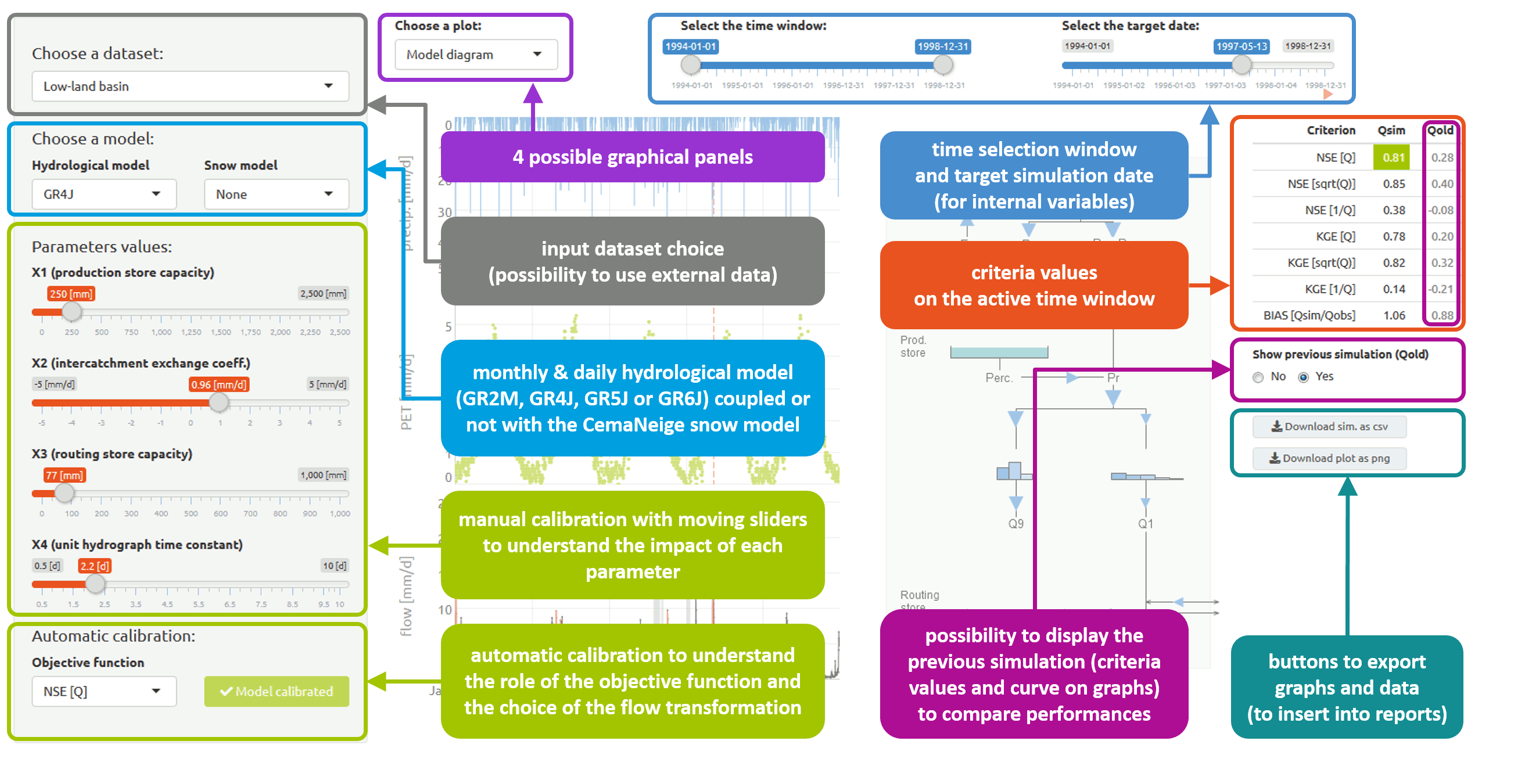
The airGRteaching package also provides the ShinyGR() function, which allows to launch a graphical user interface using the shiny package.
The ShinyGR() function needs at least:
ObsDF: a (list of)data.frame(or independant vector instead, see?ShinyGR)SimPer: a (list of) vector(s) of 2 dates to define the simulation period(s)
ShinyGR(ObsDF = BasinObs, SimPer = c("1994-01-01", "1998-12-31"))
Only monthly and daily models are currently available (GR2M, GR4J, GR5J, GR6J + CemaNeige).
If you want to use CemaNeige, you also have to define the same arguments desribed above for the PrepGR() function.
It is also possible to change the interface look; different themes are proposed (theme argument).
|
To obtain help regarding the use of the airGRteaching or airGR packages, or to suggest modifications, send an email to airGR@inrae.fr |
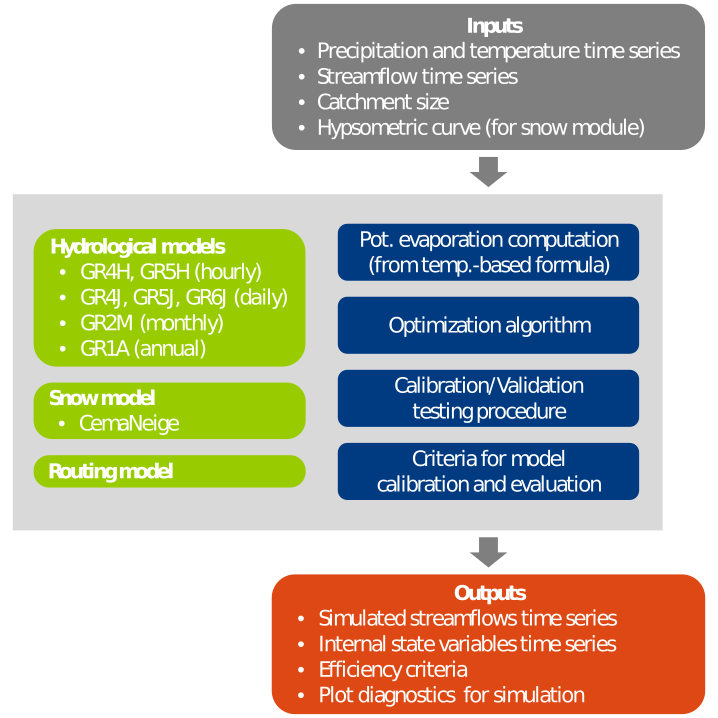
airGRteaching is a package developed in the  language devoted to the use of the GR rainfall-runoff models and the CemaNeige snowmelt and accumulation model by students and teachers.
airGRteaching is an add-on package of the airGR hydrological package.
It simplifies the use of the airGR functionalities as it only requires a basic level of programming.
The GR hydrological models in a few words:
- lumped conceptual rainfall-runoff models (GR1A, GR2M, GR4J, GR5J, GR6J, GR4H and GR5H)
- designed with the objective to be as efficient as possible for flow simulation at various time steps (from annual to hourly)
- their structures were developed to have warranted complexity and limited data requirements
- can be applied on a wide range of conditions, including snowy catchments (thanks to the CemaNeige snow model)
airGRteaching features
- Only three simple functions for a full modelling exercise:
- data preparation
- model calibration
- model simulation
- Pre-defined graphical plots:
- static plotting functions
- mouse events and interactive graphics (using the dygraphs JavaScript charting library)
- Graphical user interface based on Shiny:
- interactive flow simulation and plotting with parameters modifications
- automatic calibration button
- internal variables evolution graphs
- time period selection
- only monthly and daily models are currently available (GR2M, GR4J, GR5J, GR6J + CemaNeige)
- a demonstrator of the graphical interface is available for free online on the Sunshine website
See the “Get started” tab for examples including commands.
airGR features
- Easy implementation on numerous catchments
- Data requirements limited to lumped precip., temp. and streamflow time series
- One automatic calibration procedure
- A set of efficiency criteria
- Limited computation times (use of Fortran routines to run the models)
- Pre-defined graphical plots
- Outputs include simulated flow time series and internal variables
- User can implement its own models, efficiency criteria or optimization algorithms
- Possibility to run semi-distributed versions of the models (use facilitated by the airGRiwrm package)